On Ethernet networks, point-to-point security is provided by Media Access Control security (MACsec). MACsec is defined by IEEE standard 802.1AE. End-to-end network security can be achieved by combining MACsec with other security protocols like IP Security (IPsec) and Secure Sockets Layer (SSL). We will go through configuring the setup.
Generate Keys
Execute the following command on any host to create keys.
Create a 16-byte hexadecimal CAK:
CAK=$(dd if=/dev/urandom count=16 bs=1 2> /dev/null | hexdump -e '1/2 "%04x"')
echo $CAK
Output:
0123456789abcdef0123456789abcdefCreate a 32-byte hexadecimal CKN:
CKN=$(dd if=/dev/urandom count=32 bs=1 2> /dev/null | hexdump -e '1/2 "%04x"')
echo $CKN
Output:
0123456789abcdef0123456789abcdef0123456789abcdef0123456789abcdefConfigure Hosts
Execute the following single command on all hosts you want to connect over a MACsec network (replace the keys with your generated ones if different):
nmcli connection add type macsec con-name macsec0 ifname macsec0 connection.autoconnect yes macsec.parent enp192 macsec.mode psk macsec.mka-cak 0123456789abcdef0123456789abcdef macsec.mka-ckn 0123456789abcdef0123456789abcdef0123456789abcdef0123456789abcdefConfigure Host 1
Configure the IPv4 settings on host 1:
nmcli connection modify macsec0 ipv4.method manual ipv4.addresses '192.168.7.44/24' ipv4.gateway '192.168.7.1' ipv4.dns '8.8.8.8'
nmcli connection up macsec0
Configure Host 2
Configure the IPv4 settings on host 2:
nmcli connection modify macsec0 ipv4.method manual ipv4.addresses '192.168.7.45/24' ipv4.gateway '192.168.7.1' ipv4.dns '8.8.8.8'
nmcli connection up macsec0
Configure Host 3
Configure the IPv4 settings on host 3:
nmcli connection modify macsec0 ipv4.method manual ipv4.addresses '192.168.7.46/24' ipv4.gateway '192.168.7.1' ipv4.dns '8.8.8.8'
nmcli connection up macsec0
View Status
To view the status of the MACsec connection:
ip macsec showTraffic Encryption Test
To test the traffic encryption, I captured the traffic on the hypervisor level.
Listed the vswitch port on which macsec is enabled and non-macsec devices are configured:
net-stats -lOutput:
PortNum Type SubType SwitchName MACAddress ClientName
100663448 5 9 vSwitch1 00:0c:29:17:e7:89 haproxy-server01-wazeem
100663458 5 9 vSwitch1 00:0c:29:b2:e4:1b macsec2
100663459 5 9 vSwitch1 00:0c:29:19:fa:59 macsec3
100663460 5 9 vSwitch1 00:0c:29:26:a3:fc macsec1
Captured tcpdump from a machine without macsec enabled:
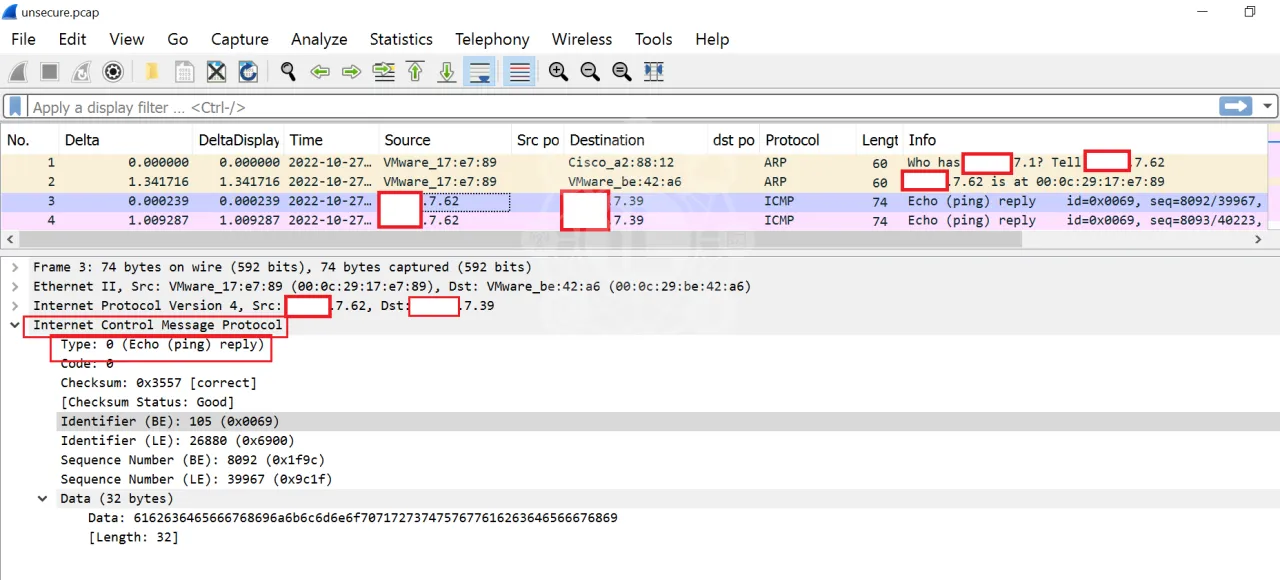
pktcap-uw --switchport 100663448 -o /vmfs/volumes/OSDATA-612963ab-b693a7b2-799b-0010e0cd0f5a/unsecure.pcapCaptured tcpdump from a machine with macsec enabled:
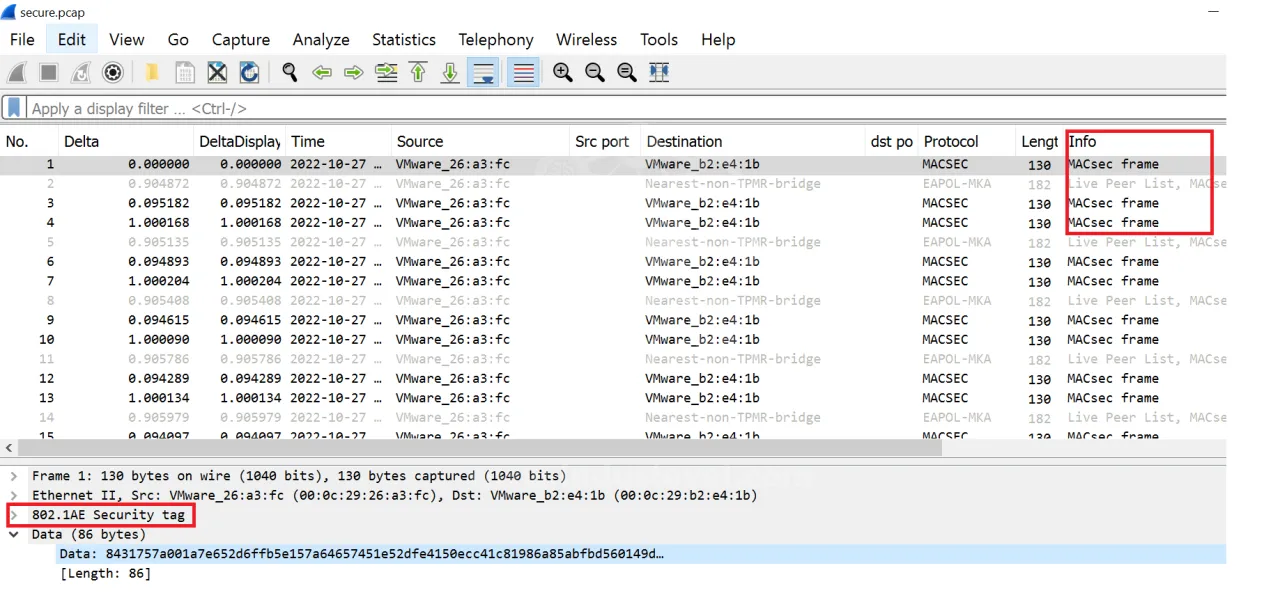
pktcap-uw --switchport 100663460 -o /vmfs/volumes/OSDATA-612963ab-b693a7b2-799b-0010e0cd0f5a/secure.pcapData Without MACsec
Data is visible on hypervisor level without macsec:
Data With MACsec
Whereas data is not readable on hypervisor level with macsec enabled: